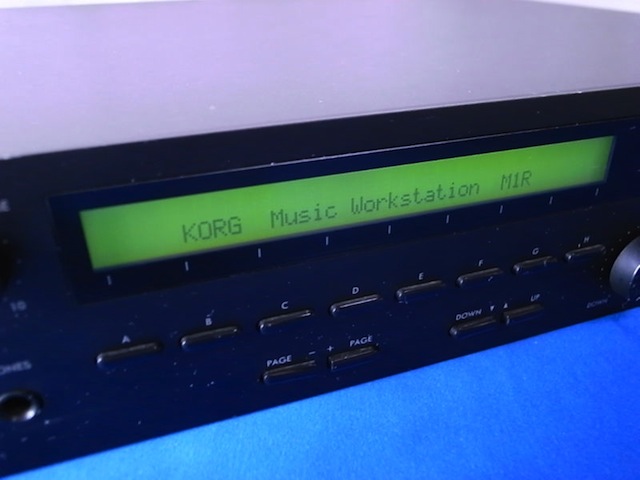
So I stopped in one of the local music shops here, they had a surprisingly good selection of used cheap keyboards. Ensoniq, Korgs, Moogs, and more. Off in the corner I found a pretty beat up Korg M1R (rack edition for the M1 workstation). Definitely in need for some major TLC. Rack Rash, check. Possible few broken buttons, check. A few inches of sticky strips of who knows what, check. But I managed to walk out with it for a great deal. Couldn't help myself.
Now for the fun part of exploring this Classic Synth. That's the funny part about this synth. You either love it, or hate it's sound. It's got that 'early 90s production/pop' sound written all over it. Not that Roland early 90s ROM/PCM sound, but a bit more distinguished and mystical. The sounds are nostalgia for me.
Korg M1 Resources and Links
Many of the older M1 and korg resource pages are full of deadlinks to geocities pages, or yahoo discussion groups long gone. But here are a few worth browsing:
M1 patches, old sys-ex utilities. Related links, and Dr Evil.
Doctor Evil and the M1 Universe
Indy Korg User Forums, resource links, and downloads.
Korg User Forums
Good resource for instructions on battery replacement, and other tutorials.
Korg M1 Source
Just Bought A Used M1?
-
On your M1...
- Make M1 MIDI ready: GLOBAL, 5, +, UP, D, UP, F, UP, H, UP.
- Remove memory protects: GLOBAL, 6, DOWN, +, B, DOWN, +, B, DOWN.
- Put M1 in 100/100 memory: GLOBAL, 6, +, +, +, DOWN, G.
- Check M1 is working: PROG, 00. Check volume. Play keyboard with headphones.
- From the software sysex utility or librarian's File menu look for "New..." or "New Bank..." to open a blank sound bank file.
- Click a "Receive" or "Capture" button to receive the M1's sound bank through your MIDI interface into the computer.
- The program will wait while you manually send the data dump from M1 to computer: GLOBAL, 7, UP, UP, UP, UP (for "All"), G.
- From the software sysex utility or librarian's File menu look for "Open..." or "Open Other..." or "Open Any..." to open an existing sysex sound bank file.
- Click a "Send" or "Transmit" button to send the sound bank through your MIDI interface into the M1.
- Click the M1's "UP" button, then the "DOWN" button. The first 00 sound of the new bank should be visible in the display.
Data dump from M1 to computer...
Send data from computer to M1...
Korg M1 Patches, Banks, Combis, and Downloads
24 banks collected from Korg User Forums
Collection of 8 COMBI banks!
Francois Rossi Collection
DrEvil Patches
Even more M1 Downloads here:
http://patcharena.com/synths/korg-m1/
Korg M1 RAM Memory Sound Cards
M1 Software Editors and Librarians
Most of the M1 editors are really dated. I may try and make a quick editor within Bidule or Max4Live. Let me know if you have any suggestions on where to start. Thanks for reading. Let me know if you have any other M1 sites I should visit.
Dear Sir.
I really hope you read this because I could do with a bit of help with Korg M1 (and Wavestation, but I'm trying to learn these beasties one at a time for my sanity's sake!)
OK. I'll just list the questions and hope you answer them sometime.
1.) Those lovely downloads of banks/patches. My Korg M1 is a Legacy Software Emulation, not a physical keyboard. Can I use them with the software version, or not (PC, XPSP3, 3gig RAM)
2.) I know you can build your own patch - I'm only a beginner - by choosing an INIT and selecting up to 8 sounds for the holes. Can you make the individual sounds within the patch start on different notes? So if you played middle C, for instance, one sound would play the C, another sound would play a third above (E) and another would play a third below (A) so you'd have a one-note chord going up and down the keyboard? If the answer's YES - how do you tune the individual sounds? I've tried detune and transpose and neither of them did what I expected at all - detune AND transpose kept the original note and added a warped harmonic to it (strange!)If possible, I'd like Sound One to be the central sound (the key you're pressing) Sound 2 to be a third above and Sound 3 to be third below. If you can choose exactly how much above/below the key you're pressing individual patch sounds actually play, so you can have weird chords if you want them - wonderful!
Well, that's my Big 2 questions for the moment. They've stumped sites everywhere - at least I've had 671 views on 3 sites and no replies, so maybe you'd know how to do it? Just remember I've got the software emulation version, not the hardware one, dunno if that makes a difference or not.
Yours respectfully
Chris.
Hi Chris,
1) There are steps on how to load the sysex M1 presets to the Korg Legacy Collection edition in the manual.
Importing system exclusive data
Here's how a system exclusive file created on the original
M1 hardware series can be imported into the M1 software
synthesizer.
1. Click the [FILE] button shown in the upper left of the
screen in each mode. From the menu that appears,
choose "Import" and then choose the data that you
want to import.
All Data…
Global, program, and combination data will be
imported. The drum kits in the Global data will be writ-
ten into user card 1, and the program data and combina-
tion data will be loaded into their respective user cards.
All Combination…
All combination data will be imported. The data will be
written into the combination user card. The data saved
in the user card will be loaded as the program data, so if
you have program data or global data (drum kit data)
you should import this data in the order of GLOBAL,
ALL PROGRAM and then ALL COMBINATION.
All Program…
All program data will be imported. The data will be
written into the program user card. The drum kits in the
user card will be loaded as the drum kits, so if you have
global data, you should import this data in the order of
GLOBAL and then ALL PROGRAM.
1 Combination…
Data for one combination will be imported. The data
will be written into the combination user card 1. The
operation is the same as for ALL COMBINATION.
1 Program…
Data for one program will be imported. The data will be
written into the program user card 1. The operation is
the same as for ALL PROGRAM.
Global Data…
Global data will be imported. Parameters that corre-
spond to the M1 software synthesizer's Global mode
will be overwritten. Drum kits will be written to the
user card 1.
2. In the dialog box that appears, choose the location of
file, select the file, and click the [Open] button.
The system exclusive file will be imported.
If you're using an M1 or M1EX multisound or drum
sound, the bank data of the original M1 will be recog-
nized correctly. However if you're using an option
card, it will be recognized as card 1 by the M1 software
synthesizer, so you'll need to re-select this after
importing.
2) Regarding your second question. I would approach this a different way. Rather then programming your chords inside of the M1 patches. Use your sequencer/hosts MIDI Effects capabilities to produce this chord effect.
Cheers!
Hello,
replaced a new battery in my M1 Korg.
Used MIDI-OX to send patches i downloaded from Internet.
Problem is that the process shows its complete but the names of patches dont appear.
I still get Init Prog 00. Followed all instructions from various M1 Korg forums.
What can i do ?
Hi Noah,
I ran into the same issue after swapping out my battery. After you do this for some reason the default behavior is to lock overwriting on the SYSEX memory. You need to go into your Global settings and remove the SYSEX memory protection. If you scroll through the Global menus it will look like "Prog Memory Protect" ON. Switch this off for Prog, COMBI, and SEQ.
Good luck!
I just bought an M1 and having a great time using it! This is a classic, a bit of learning trial by error but worth it. I took it to jam session last week and we all thought the sounds were fun and sounded great!
Yeah it's a classic!
I also use M1 from Korg Legacy Collection. But it opens only banks with .fxb format. How can I solve this problem?
Hi There
Had an M1 for a while. Recently used Orchestral card and seq card and now Combi and Card buttons not working... Even after reboot with cards removed, it no longer goes into combi mode...
Any ideas?
Cheers
Aidan
Hi - I have a korg M1 and the battery went flat. I have replaced the battery and located the M1preeload sysex file. Using midiox I have loaded the M! - after setting memory protects off and enabling the sysex switch within the korg. My problem is that the usb-midi device shows that the data is being transmitted but when I switch the korg off and then on again - I still have the init prog message. Are there any hardware switches within the korg? I am running W7 - 64 but also tried with similar results on XP64. Don't think it is a usb-midi interface problem but can't be sure.
Any ideas?
thanks
phil
Hi,
A few things.
- Double check your MIDI Channels
- Try using a different SYSEX manager. The free C6 utility from Elektron is very easy to setup and use, try it here:
http://www.elektron.se/sites/default/files/products/files/Elektron_C6_Windows_v1.4F.zip
http://www.elektron.se/sites/default/files/products/files/Elektron_C6_OSX_v1.4E.dmg
- If that doesn't work try using a different MIDI interface or a friends if you have access to another one.
Good Luck
Hi & thanks so much for the response- will give your suggestions a go. What I have established since my last message is that I can save data (whatever is still on the m1 via midiox. I tried us8ing this saved data file and backloading the sysex file (now renamed and formatted) but still with no joy.
I get the distinct impression that I am having a permissions issue.
Anyway, will try and let you know what happens.
thanks again - I appreciate it.
phil
what system are you running? XP64, w764, OSx (Mac)? I am sitting on a 64 bit machine (PC) and suspect that this is the cause.
I do have an older XP32 machine. Will revert to XP64 (same machine as w764 and see if I get any joy - if not will try transferring all this data to xp32 machine). Reason I ask is that c6 hangs when I try to exit after transferring of data. Result is similar to midiox - data appears to transfer but korg is not registering any effect although all software switches are set to receive.
Hi there,
Thanks for your helpful posts. After days of attempts and frustration i finally managed to load any sound bank into my M1 i wanted to. The right midi interface appeared to be the solution.
However, one thing i can't figure out: is it possible to make a selection of programs out of all the sound banks and send these to my M1 memory? That way i can have all my favorite sounds available and dispose all the programs i won't use.
I am using Midi-OX.
Thanks in advance!
You can send individual SysEx patches but only if they were saved separetly. No way to parse out and make a selection of a saved SysEx Bank file. The best way would be to load the banks one by one, save all of your favorite SysEx patches individually, then load them back onto the M1.
Cheers!
Hi and thanks for the Tutorial on how to load the default settings into the M1!
I just bought a used one where the battery went dead and I needed to upload the Sysex files.
Here's a short adventure on uploading new Sysex Files on my M1.
On ebay I've bought a cheap-o-USB-Midi converter for a few Euro's and now I can send and receive midi data! Nice! :) This means that the Synthesizer works perfectly, except that there is this one squeeeeky somewhat piano-ish sound (no sounds in banks).
As I did all the steps including the downloading of the Midi-Ox the uploading came to a grinding halt when the files are somewhat larger than 32Kb.
The message that appeared was that the buffer is full and I need to make more memory available on my computer (which I find a strange message as I know that my computer has enough memory to work with 8GB)
After doing some research on the great internetzzz I found out that changing the the:"Delay Between Bufers" to a 200 milliseconds did the trick for me.
The biggest file I could find was 52Kb and this uploaded with no problems :) Yay!
After fiddling around with the values it appears that 100 milliseconds will do just fine too.
My suggestion for anyone that has problems with uploading large files:"Keep rasing the value until the upload runs smooth without errors". Best guess is start from 200 milliseconds.
Btw. I'm using Win7 as OS.
Hi Matthijs,
Thanks for your report. Glad you've got your M1 working in proper order. Enjoy!
Hello all.
Just to say i got my M1 up and running with a sysex dump. I used a roland um-one midi usb cable for the job. To anyone trying to do this as i did DO NOT use cheap midi/usb from ebay or the likes. They do NOT work.
LOVING IT!!
Hello all,
First, great advice above.
But...I am in still in hell as most of the above posts relate to.
My M1 internal battery died about 18 months ago and I am just now getting around to sorting it out.
Replace battery - tick
Buy USB->MIDI cable - Tick (I spent about AU $45.00 at my local music shop - Ashton brand)
Download SyseX M1 preloads - Tick (4 files - Prog, Combi, Seq, Sys? ) + a couple of others
Download Midi Ox software - tick
Running a W7/64bit machine.
Did everything as discussed in every forum or post (enabling Sysx and turning internal memories = off) but still end up with the INIT PROG on every one of the 100 Progs/Combi's. I must have done this over 100 times in the past week or so. Green light flashed on my Ashton USBMidi socket when I am sending SydEx files.
Frustrated, as I can see the M1 speaking with my PC when I touch the keys. Displays on Midi-Ox panel.
I also tried BOMES Send Sysex program (Vers 1.3). Same result but BOMES utility is much easier to navigate than Midi OX.
Next, took my old work PC out of storage (Win XP 32bit) and took it home. Tried all of the above but same result.
Hmmmmmm
Could it be as simple as "find another midi-usb lead?" I hope not.
I am seeking guidance if there is any.
Thanks
Dino
Hey Dino,
You may want to try another MIDI device. Maybe a friend has one close by that you can borrow or bring your M1 over to test?
Also try Elektron's free C6 MIDI SYSEX application, I use this one and it works great:
http://www.elektron.se/support-and-downloads
Hi I wonder could you help me.
How can I load a single patch into my M1 and still keep all my other sounds . I've been using korg m1 legacy on my pc but don't know how to export one Combi to m1.
Hope I explained myself good enough for you to understand.
Thanks in advance.
James
Hi James,
If you have a single combi or patch saved as a sysex file you can import that by sending the SysEx to your M1.
- First back up your M1 programs and combis by using the export send SysEx feature on your M1
- Then you'll need to send the SysEx files from your computer to the M1. I just recently found an M1 Librarian for the PC that you may want to try:
http://www.triptico.com/software/wm1.html
This will let you send patches individually or in groups.
Hi there, I have an M1R and the KLC M1 software. Both are awesome I must say. I'm wondering if there is any way I can dump the original wave/voice presets from the KLC M1 to the M1R. In the software I see options for importing stuff and options for saving in .m1all file format.
I guess, if I somehow manage to export the data from one of the original cards enclosed in the KLC M1 software in a format that can be converted to sysex, I can then load it into the M1R using a sysex librarian.
I also wonder if the M1 architecture allows import/export of waveform data via sysex. It sounds like the factory waveforms are baked in rom and the factory reset sysex files only contain the voice parameters' data.
I hope this wasn't too confusing, I love the KLC M1 sw, but I love even more being able to play the M1R standalone without having to use any computer/software thingie :)
Thanks a lot in advance :)
Hello,
I have a client that has a rack mount M1R and the battery backup went out and he lost his custom patches. There is one patch that he loved called Madonna Bass and I can't seem to find it anywhere.
Also on his JV-880 he had the same problem with the battery backup and had a patch called Nylon/Steel or something like that with maybe abbreviated spelling and I've looked all over for this patch.
Any possibility of finding these patches?
Thanks!
Greg
Hello!
I've been reading this thread (along with many others on the web) about restoring patches into the M1.
I have an M1 that I've been using for years and am now receiving a "battery low" message.
I backup my M1 to my computer from time to time using MIDI-OX by performing a DUMP ALL function. File size is about 53K.
Over the years I have edited some of the patches which is why I perform backups from time to time.
I need to replace the battery and if I'm interpreting all the threads correctly, I will loose all my patches during that process.
I don't want to reload the M1 with the factory patches but rather reload it from my most recent backup which contains all the edits I've performed over the years. However, it seems to me that a 53K file seems to be a bit small for storing 100 PROGS, 100 COMBIS, GLOBAL, etc data.
My question is...what exactly is lost when the battery is removed? Is it just the 100 PROGS, 100 COMBIS, etc (which would explain why the file is only 53K) or are the actual waveforms stored in ROM lost (that the PROGS and COMBIS are derived from)?
I hope my question makes sense. Perhaps I've been reading too many threads on the web on the subject and I'm now a bit confused.
If anyone can explain I would appreciate it very much.
Thanks...Ed
configuracion bufer de salida nadamas checa que efectivamente se envian los datos al canal asignado