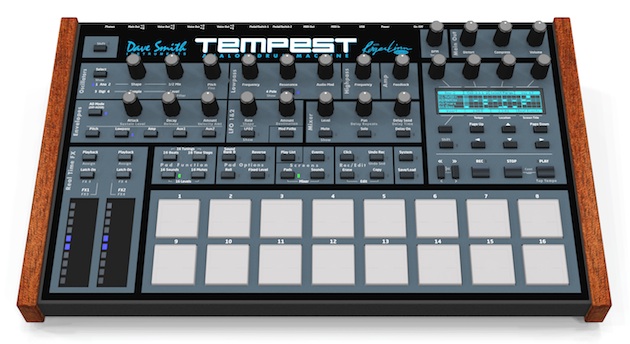
With the new, free 1.3 update, all Tempest panel controls are now fully implemented!!!
Here are the improvements in the Tempest OS v1.3:
Play Lists
Play Lists are programmed lists of beats (drumbeats) that are played back in sequence. You can create them either by manual editing on the screen, or by automatic recording of your real-time beat arrangements during performance. For example, perform an arrangement of beats live then without stopping the beat, hear this sequence of beats instantly play back exactly as you performed it, while you play sounds, perform real-time effects or other performance manipulations on top of it. It's an exciting and useful performance feature.
Undo Sound / Revert Sound
Hold SHIFT while pressing UNDO REC in order to undo the most recent sound edit.
Assign Specific MIDI Note Numbers to Sounds
You can now assign each incoming note number to play a specific sound pad.
Change function of incoming MIDI notes with front-panel Pad Function buttons
For example, when playing Tempest's sounds from external MIDI drum pads, pressing one of the Pad Function buttons changes what your MIDI drum pads will do:
> Press 16 Sounds and your MIDI drum pads play 16 sounds
> Press 16 Beats and your MIDI drum pads switch between 16 drumbeats
> Press 16 Mutes and your MIDI drum pads mute or unmute the playback of 16 different drum sounds.
> Press 16 Tunings to play any sound at 16 different tunings.
> Press 16 Steps and use your MIDI drum pads to program drumbeats in step time, turning a single sound on/off at 16 different time locations within the beat.
The System parameters are now organized by category
System parameters are now organized by function into 7 different screens, making it easier to find the System parameter you're looking for.
Plus various other additions and improvements
Sweet!
Tempest is an amazing AND deep performance instrument. It is baffling however that the designers have not included Volume Control (CC7) in the MIDI implementation. I have spoken to support at DSI and he confirmed it. I have not found a convenient workaround for this shortcoming. It means that it is very difficult to use it in MIDI sequences without keeping one hand (or foot) on the hardware volume control. Please, Dave Smith Instruments, add this feature to your operating system for Tempest. In the meantime, if any one does know of a workaround using midi automation, please let me know.