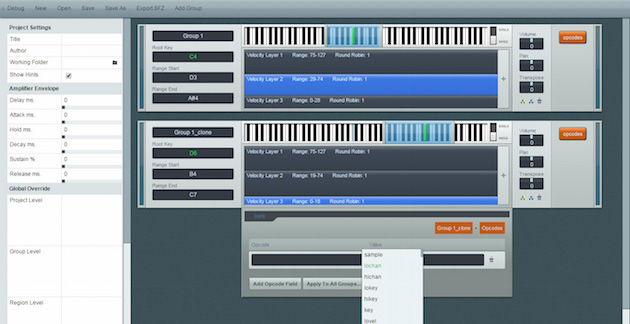
Mildon from Mildon.me has developed a visual SFZ instrument mapper! Very cool. SFZ Designer is a free sample mapping tool designed to assist mapping samples for Multi-sampled instruments. It has tools to help with multiple velocity layers velocity splits, round-robin layers, and more. The current 0.21 release supports SFZ 1.0 opcodes and exports .sfz files for use with your favorite SFZ player or sampler.
Here is Mildon's overview video:
Demonstrates the basics of SFZ Designer, a visual audio sample mapper that features a streamlined workflow, assisted opcode entry, draggable key-range and velocity splits-points, and more. It supports all opcodes and directly exports to .sfz format.
Check out the SFZ Designer webpage here:
Features:
- True visualization of groups (key-range > velocities > samples).
- Draggable key-range and root key selection over the pianoroll.
- Draggable velocity layer split-points (up to 8 velocity layers).
- Supports multiple round-robin samples per velocity layer.
- Tune, Pan, and Volume controls for each sample.
- Transpose, Pan, and Volume controls for each group.
- Assisted opcode entry with auto-suggest and validation.
- Advanced opcode apply-to-all options.
- Group cloning and structure cloning.
- Accepts currently unsupported opcodes.
- Project-level Amplifier DAHDSR controls.
- Global Override at project/group/region-levels.
- Full support for SFZ 1.0 opcodes (soon SFZ 2.0 support).
- Export-As-SFZ with auto-conversion of sample paths to relative paths.